Windows Defender SmartScreen Warning
Last updated: July 26, 2026
Introduction
Blockdis is brand-new software built and maintained by a solo developer. When you download and run the Windows installer for the first time, you may see a blue screen from Microsoft Defender SmartScreen saying that Windows protected your PC.
This page explains why that happens and how to continue safely if you trust Blockdis and downloaded it from getblockdis.com.
Why does Windows show this warning?
Windows automatically flags executable files (`.exe`) from publishers it does not yet recognize. Blockdis is not malware — the app only connects to the Blockdis API to sign you in and sync your block rules — but Microsoft has no long download history for this file yet.
Over time, as more people download and run a properly distributed build, Windows builds a reputation for the application and SmartScreen warnings become less common. Code signing also helps; Blockdis will adopt signing as the product grows.
How to install Blockdis anyway
If you downloaded Blockdis from the official website and want to proceed, follow these steps on the SmartScreen dialog:
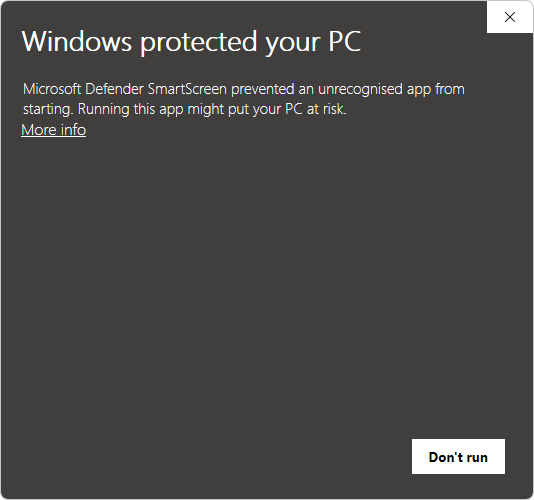
Step 1: Click "More info"
On the first SmartScreen screen, click the More info link below the warning text. This reveals details about the app and additional actions.
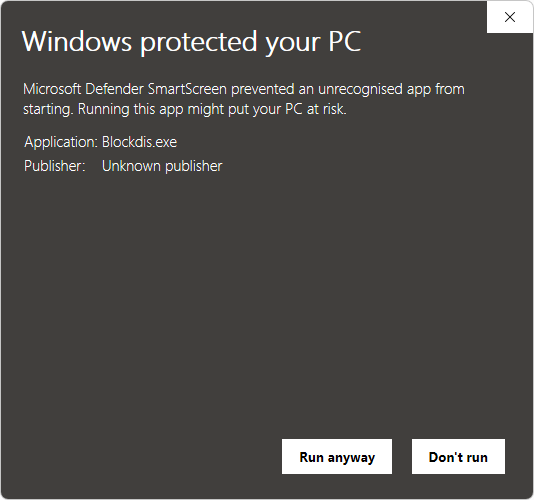
Step 2: Click "Run anyway"
After expanding the dialog, click Run anyway to launch the Blockdis installer. Only do this if you intentionally downloaded Blockdis from getblockdis.com.
Still unsure?
Contact hello@getblockdis.com if you have questions about the download or the warning. Always download Blockdis only from the official site or links published by Blockdis.